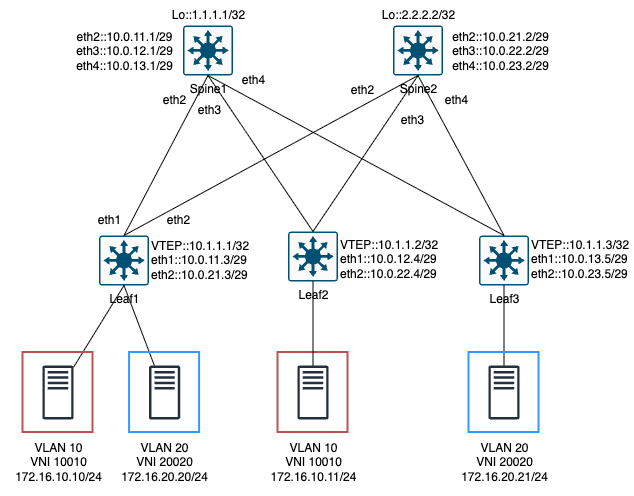
설정 정보 (Leaf)
EVPN 컨트롤 플레인 없이 VXLAN L2VPN을 구성하는 방식은 BGP 없이 데이터 플레인만으로 L2 도메인을 확장하며, 원격 VTEP 정보를 수동으로 지정합니다.
- VTEP IP 주소 지정:
vxlan source-interface명령을 통해 VXLAN 터널 패킷의 출발지 IP 주소, 즉 자신의 VTEP 주소를 지정합니다. - VLAN-VNI 매핑:
vxlan vlan ... vni ...명령으로 로컬 L2 세그먼트인 VLAN과 전체 VXLAN 네트워크에서 사용될 VNI(Virtual Network Identifier)를 1:1로 매핑합니다. - 수동 VTEP 지정 (HER)
- BUM(Broadcast, Unknown Unicast, Multicast) 트래픽을 복제해서 보낼 원격 VTEP 목록을
vxlan flood vtep명령으로 직접 지정합니다. - Head-End Replication 방식은 모든 Leaf에 다른 모든 Leaf의 VTEP IP를 수동으로 설정해야 합니다.
- BUM(Broadcast, Unknown Unicast, Multicast) 트래픽을 복제해서 보낼 원격 VTEP 목록을
[Leaf1]

[VxLAN]
interface Vxlan1
   vxlan source-interface Loopback0
   vxlan udp-port 4789
   vxlan vlan 10 vni 10010
   vxlan vlan 20 vni 20020
   vxlan flood vtep 10.1.1.2 10.1.1.3
[Leaf2]

[VxLAN]
interface Vxlan1
   vxlan source-interface Loopback0
   vxlan udp-port 4789
   vxlan vlan 10 vni 10010
   vxlan flood vtep 10.1.1.1 10.1.1.3
[Leaf3]

[VxLAN]
interface Vxlan1
   vxlan source-interface Loopback0
   vxlan udp-port 4789
   vxlan vlan 20 vni 20020
   vxlan flood vtep 10.1.1.1 10.1.1.2
라우팅 테이블 확인
Spine 스위치의 라우팅 테이블을 확인하면 Leaf들의 VTEP IP(10.1.1.x 등)를 포함한 Underlay 네트워크 정보만 학습된 것을 볼 수 있습니다.
호스트가 사용하는 Overlay 대역(172.16.x.x)에 대한 경로는 존재하지 않으며, 이는 VXLAN 터널링에 관여하지 않고 오직 IP 패킷 전송 역할만 하는 Spine 스위치의 정상적인 상태입니다.
Spine1#show ip route
...

Gateway of last resort:
 C        1.1.1.1/32
           directly connected, Loopback0
 O        2.2.2.2/32 [110/20]
           via 10.0.0.2, Ethernet1
 C        10.0.0.0/29
           directly connected, Ethernet1
 C        10.0.11.0/29
           directly connected, Ethernet2
 C        10.0.12.0/29
           directly connected, Ethernet3
 C        10.0.13.0/29
           directly connected, Ethernet4
 O        10.0.21.0/29 [110/20]
           via 10.0.0.2, Ethernet1
           via 10.0.11.3, Ethernet2
 O        10.0.22.0/29 [110/20]
           via 10.0.0.2, Ethernet1
           via 10.0.12.4, Ethernet3
 O        10.0.23.0/29 [110/20]
           via 10.0.0.2, Ethernet1
           via 10.0.13.5, Ethernet4
 O        10.1.1.1/32 [110/20]
           via 10.0.11.3, Ethernet2
 O        10.1.1.2/32 [110/20]
           via 10.0.12.4, Ethernet3
 O        10.1.1.3/32 [110/20]
           via 10.0.13.5, Ethernet4
[Leaf1]
Leaf1#show ip ospf neighbor
Neighbor ID Instance VRF Pri State Dead Time Address Interface
2.2.2.2 1 default 1 FULL/BDR 00:00:29 10.0.21.2 Ethernet2
1.1.1.1 1 default 1 FULL/BDR 00:00:31 10.0.11.1 Ethernet1
[Leaf2]
Leaf2#show ip ospf neighbor
Neighbor ID Instance VRF Pri State Dead Time Address Interface
1.1.1.1 1 default 1 FULL/BDR 00:00:33 10.0.12.1 Ethernet1
2.2.2.2 1 default 1 FULL/BDR 00:00:32 10.0.22.2 Ethernet2
[Leaf3]
Leaf3#show ip ospf neighbor
Neighbor ID Instance VRF Pri State Dead Time Address Interface
1.1.1.1 1 default 1 FULL/BDR 00:00:32 10.0.13.1 Ethernet1
2.2.2.2 1 default 1 FULL/BDR 00:00:38 10.0.23.2 Ethernet2[Leaf1]
Leaf1#show ip route ospf
...
O 1.1.1.1/32 [110/20]
via 10.0.11.1, Ethernet1
O 2.2.2.2/32 [110/20]
via 10.0.21.2, Ethernet2
O 10.0.0.0/29 [110/20]
via 10.0.11.1, Ethernet1
via 10.0.21.2, Ethernet2
O 10.0.12.0/29 [110/20]
via 10.0.11.1, Ethernet1
O 10.0.13.0/29 [110/20]
via 10.0.11.1, Ethernet1
O 10.0.22.0/29 [110/20]
via 10.0.21.2, Ethernet2
O 10.0.23.0/29 [110/20]
via 10.0.21.2, Ethernet2
O 10.1.1.2/32 [110/30]
via 10.0.11.1, Ethernet1
via 10.0.21.2, Ethernet2
O 10.1.1.3/32 [110/30]
via 10.0.11.1, Ethernet1
via 10.0.21.2, Ethernet2[Leaf2]
Leaf2#show ip route ospf
...
O 1.1.1.1/32 [110/20]
via 10.0.11.1, Ethernet1
O 2.2.2.2/32 [110/20]
via 10.0.21.2, Ethernet2
O 10.0.0.0/29 [110/20]
via 10.0.12.1, Ethernet1
via 10.0.22.2, Ethernet2
O 10.0.11.0/29 [110/20]
via 10.0.12.1, Ethernet1
O 10.0.13.0/29 [110/20]
via 10.0.12.1, Ethernet1
O 10.0.21.0/29 [110/20]
via 10.0.22.2, Ethernet2
O 10.0.23.0/29 [110/20]
via 10.0.22.2, Ethernet2
O 10.1.1.1/32 [110/30]
via 10.0.12.1, Ethernet1
via 10.0.22.2, Ethernet2
O 10.1.1.3/32 [110/30]
via 10.0.12.1, Ethernet1
via 10.0.22.2, Ethernet2[Leaf3]
Leaf3#show ip route ospf
...
O 1.1.1.1/32 [110/20]
via 10.0.11.1, Ethernet1
O 2.2.2.2/32 [110/20]
via 10.0.21.2, Ethernet2
O 10.0.0.0/29 [110/20]
via 10.0.13.1, Ethernet1
via 10.0.23.2, Ethernet2
O 10.0.11.0/29 [110/20]
via 10.0.13.1, Ethernet1
O 10.0.12.0/29 [110/20]
via 10.0.13.1, Ethernet1
O 10.0.21.0/29 [110/20]
via 10.0.23.2, Ethernet2
O 10.0.22.0/29 [110/20]
via 10.0.23.2, Ethernet2
O 10.1.1.1/32 [110/30]
via 10.0.13.1, Ethernet1
via 10.0.23.2, Ethernet2
O 10.1.1.2/32 [110/30]
via 10.0.13.1, Ethernet1
via 10.0.23.2, Ethernet2
VXLAN 터널 동작 상태
vxlan 터널 상태 확인 시 Tunnel Type(s)에서 flood와 unicast, flood의 차이점을 볼 수 있습니다.
show vxlan vtep 명령어를 통해 데이터 플레인의 학습 상태를 직접 확인할 수 있습니다. Tunnel Type(s) 항목으로 VTEP 간의 연결 상태를 확인할 수 있습니다.
- `Flood`: 처음에는 모든 Remote VTEP로 BUM 트래픽을 뿌리기 위해 flood 터널이 생성됨.
- `Unicast`: 특정 Remote VTEP 뒤에 있는 Host MAC을 학습해야 “MAC → Remote VTEP” 매핑이 생기고, 그때부터 unicast 터널이 추가됨.
Flood & Learn 방식에서는 Remote VTEP에 대한 unicast 터널이 자동으로 생기지 않습니다. Unicast 터널은 실제 MAC 학습이 일어난 뒤에만 활성화됩니다.
- Leaf1의 경우: Leaf2와 Leaf3에 연결된 호스트와 이미 통신하여 MAC 주소를 학습했기 때문에, 두 VTEP에 대해 모두
unicast, flood터널이 활성화되었습니다. - Leaf2와 Leaf3의 경우: 서로 간에는 아직 통신이 발생하지 않아 상대방 호스트의 MAC 주소를 학습하지 못했습니다. 따라서 Leaf2는 Leaf3에 대해, Leaf3는 Leaf2에 대해
flood터널만 표시됩니다.
즉, 특정 VTEP에 대해 flood만 보인다는 것은 아직 해당 VTEP 너머의 MAC 주소를 학습하여 Unicast 경로를 만들지 못했다는 의미입니다.
[Leaf1]
Leaf1#show vxlan vtep
Remote VTEPS for Vxlan1:

VTEP           Tunnel Type(s)
-------------- --------------
10.1.1.2       unicast, flood
10.1.1.3       unicast, flood

Total number of remote VTEPS:  2

Leaf1#show vxlan vni
VNI to VLAN Mapping for Vxlan1
VNI         VLAN       Source       Interface       802.1Q Tag
----------- ---------- ------------ --------------- ----------
10010       10         static       Ethernet3       untagged
                                    Vxlan1          10
20020       20         static       Ethernet4       untagged
                                    Vxlan1          20
[Leaf2]
Leaf2#show vxlan vtep
Remote VTEPS for Vxlan1:
VTEP Tunnel Type(s)
-------------- --------------
10.1.1.1 flood, unicast
10.1.1.3 flood
Total number of remote VTEPS: 2
Leaf2#show vxlan vni
VNI to VLAN Mapping for Vxlan1
VNI VLAN Source Interface 802.1Q Tag
----------- ---------- ------------ --------------- ----------
10010 10 static Ethernet3 untagged
Vxlan1 10 [Leaf3]
Leaf3#show vxlan vtep
Remote VTEPS for Vxlan1:
VTEP Tunnel Type(s)
-------------- --------------
10.1.1.1 flood, unicast
10.1.1.2 flood
Total number of remote VTEPS: 2
Leaf3#show vxlan vni
VNI to VLAN Mapping for Vxlan1
VNI VLAN Source Interface 802.1Q Tag
----------- ---------- ------------ --------------- ----------
20020 20 static Ethernet3 untagged
Vxlan1 20
MAC 학습 테이블
show mac address-table에는 로컬 및 원격 호스트 MAC이 모두 표시되며, 원격 MAC은 Vx1 인터페이스를 통해 학습된 것으로 나타납니다.
show vxlan address-table은 원격지 MAC과 해당 MAC이 위치한 VTEP IP 주소의 매핑 정보만 구체적으로 보여줍니다. 이 학습 정보를 기반으로 스위치는 더 이상 불필요한 플러딩 없이 유니캐스트 트래픽을 해당 VTEP으로 직접 터널링합니다.
[Leaf1]
Leaf1#show vxlan address-table
          Vxlan Mac Address Table
----------------------------------------------------------------------

VLAN  Mac Address     Type      Prt  VTEP             Moves   Last Move
----  -----------     ----      ---  ----             -----   ---------
  10  aac1.ab07.61fa  DYNAMIC   Vx1  10.1.1.2         1       0:24:54 ago
  20  aac1.ab25.fcc0  DYNAMIC   Vx1  10.1.1.3         1       0:24:53 ago

Leaf1#show mac address-table
          Mac Address Table
------------------------------------------------------------------

Vlan    Mac Address       Type        Ports      Moves   Last Move
----    -----------       ----        -----      -----   ---------
  10    aac1.ab06.75cc    DYNAMIC     Et3        1       0:26:39 ago
  10    aac1.ab07.61fa    DYNAMIC     Vx1        1       0:26:39 ago
  20    aac1.ab25.fcc0    DYNAMIC     Vx1        1       0:26:38 ago
  20    aac1.aba5.d458    DYNAMIC     Et4        1       0:26:38 ago

[참고용]
Leaf1: 001c.731a.10f8
Leaf2: 001c.73d5.8493
Leaf3: 001c.73f3.76dc
host1: 001c.734a.c36c
  Ethernet1: aac1.ab06.75cc
host2: 001c.73a0.3131
  Ethernet1: aac1.aba5.d458
host3: 001c.732c.bb85
  Ethernet1: aac1.ab07.61fa
host4: 001c.7387.e45e
  Ethernet1: aac1.ab25.fcc0
[Leaf2]
Leaf2#show vxlan address-table
          Vxlan Mac Address Table
----------------------------------------------------------------------

VLAN  Mac Address     Type      Prt  VTEP             Moves   Last Move
----  -----------     ----      ---  ----             -----   ---------
  10  aac1.ab06.75cc  DYNAMIC   Vx1  10.1.1.1         1       0:25:48 ago

Leaf2#show mac address-table
          Mac Address Table
------------------------------------------------------------------

Vlan    Mac Address       Type        Ports      Moves   Last Move
----    -----------       ----        -----      -----   ---------
  10    aac1.ab06.75cc    DYNAMIC     Vx1        1       0:26:49 ago
  10    aac1.ab07.61fa    DYNAMIC     Et3        1       0:26:49 ago
[Leaf3]
Leaf3#show vxlan address-table
Vxlan Mac Address Table
----------------------------------------------------------------------
VLAN Mac Address Type Prt VTEP Moves Last Move
---- ----------- ---- --- ---- ----- ---------
20 aac1.aba5.d458 DYNAMIC Vx1 10.1.1.1 1 0:32:41 ago
Leaf3#show mac address-table
Mac Address Table
------------------------------------------------------------------
Vlan Mac Address Type Ports Moves Last Move
---- ----------- ---- ----- ----- ---------
20 aac1.ab25.fcc0 DYNAMIC Et3 1 0:32:46 ago
20 aac1.aba5.d458 DYNAMIC Vx1 1 0:32:46 ago
Ping 테스트
host1#ping 172.16.10.11
PING 172.16.10.11 (172.16.10.11) 72(100) bytes of data.
80 bytes from 172.16.10.11: icmp_seq=1 ttl=64 time=14.1 ms
80 bytes from 172.16.10.11: icmp_seq=2 ttl=64 time=5.56 ms
80 bytes from 172.16.10.11: icmp_seq=3 ttl=64 time=2.61 ms

host1#show arp
Address         Age (sec)  Hardware Addr   Interface
172.16.10.11      1:08:37  aac1.ab07.61fa  Ethernet1

host3#ping 172.16.10.10
PING 172.16.10.10 (172.16.10.10) 72(100) bytes of data.
80 bytes from 172.16.10.10: icmp_seq=1 ttl=64 time=4.47 ms
80 bytes from 172.16.10.10: icmp_seq=2 ttl=64 time=3.01 ms
80 bytes from 172.16.10.10: icmp_seq=3 ttl=64 time=2.91 ms

host3#show arp
Address         Age (sec)  Hardware Addr   Interface
172.16.10.10      1:44:23  aac1.ab06.75cc  Ethernet1
host2#ping 172.16.20.21
PING 172.16.20.21 (172.16.20.21) 72(100) bytes of data.
80 bytes from 172.16.20.21: icmp_seq=1 ttl=64 time=25.0 ms
80 bytes from 172.16.20.21: icmp_seq=2 ttl=64 time=16.1 ms
80 bytes from 172.16.20.21: icmp_seq=3 ttl=64 time=7.14 ms
host2#show arp
Address Age (sec) Hardware Addr Interface
172.16.20.21 1:27:33 aac1.ab25.fcc0 Ethernet1
host4#ping 172.16.20.20
PING 172.16.20.20 (172.16.20.20) 72(100) bytes of data.
80 bytes from 172.16.20.20: icmp_seq=1 ttl=64 time=4.17 ms
80 bytes from 172.16.20.20: icmp_seq=2 ttl=64 time=4.48 ms
80 bytes from 172.16.20.20: icmp_seq=3 ttl=64 time=2.64 ms
host4#show arp
Address Age (sec) Hardware Addr Interface
172.16.20.20 1:18:52 aac1.aba5.d458 Ethernet1
VNI missmatch
VXLAN L2VPN에서 가장 흔한 장애 원인 중 하나는 VNI 불일치입니다. 의도적으로 Leaf1과 Leaf2의 VLAN 10에 대해 VNI를 각각 10010과 10011로 다르게 설정했습니다.
[Leaf1]
interface Vxlan1
   vxlan source-interface Loopback0
   vxlan udp-port 4789
   vxlan vlan 10 vni 10010
   vxlan vlan 20 vni 20020
   vxlan flood vtep 10.1.1.2 10.1.1.3
[Leaf2]
interface Vxlan1
vxlan source-interface Loopback0
vxlan udp-port 4789
vxlan vlan 10 vni 10011
vxlan flood vtep 10.1.1.1 10.1.1.3[Leaf3]
interface Vxlan1
vxlan source-interface Loopback0
vxlan udp-port 4789
vxlan vlan 20 vni 20020
vxlan flood vtep 10.1.1.1 10.1.1.2
VNI는 터널링된 L2 프레임이 속한 네트워크를 식별하는 태그와 같아서, 값이 다르면 스위치는 패킷을 수신하더라도 자신이 모르는 트래픽으로 간주하여 폐기합니다.
Leaf1과 Leaf2는 서로의 MAC 주소를 전혀 학습하지 못하고(show vxlan address-table 확인), 터널 상태 역시 unicast로 발전하지 못한 채 flood에 머물게 됩니다.
[Leaf1]
Leaf1#show vxlan address-table
          Vxlan Mac Address Table
----------------------------------------------------------------------

VLAN  Mac Address     Type      Prt  VTEP             Moves   Last Move
----  -----------     ----      ---  ----             -----   ---------
  20  aac1.ab25.fcc0  DYNAMIC   Vx1  10.1.1.3         1       0:01:13 ago
Total Remote Mac Addresses for this criterion: 1
Leaf1#show mac address-table
          Mac Address Table
------------------------------------------------------------------

Vlan    Mac Address       Type        Ports      Moves   Last Move
----    -----------       ----        -----      -----   ---------
  10    aac1.ab06.75cc    DYNAMIC     Et3        1       0:01:31 ago
  20    aac1.ab25.fcc0    DYNAMIC     Vx1        1       0:01:16 ago
  20    aac1.aba5.d458    DYNAMIC     Et4        1       0:01:16 ago

[Leaf2]
Leaf2#show vxlan address-table
          Vxlan Mac Address Table
----------------------------------------------------------------------

VLAN  Mac Address     Type      Prt  VTEP             Moves   Last Move
----  -----------     ----      ---  ----             -----   ---------

Leaf2#show mac address-table
          Mac Address Table
------------------------------------------------------------------

Vlan    Mac Address       Type        Ports      Moves   Last Move
----    -----------       ----        -----      -----   ---------
Leaf1#show vxlan vtep
Remote VTEPS for Vxlan1:
VTEP Tunnel Type(s)
-------------- --------------
10.1.1.2 flood
10.1.1.3 unicast, flood
Leaf2#show vxlan vtep
Remote VTEPS for Vxlan1:
VTEP Tunnel Type(s)
-------------- --------------
10.1.1.1 flood
10.1.1.3 flood
최종적으로 VLAN 10(172.16.10.x/24)에 속한 호스트 간의 ping 테스트는 실패하며, VNI가 올바르게 설정된 VLAN 20(172.16.20.x/24)의 통신은 정상적으로 이루어집니다.
host1#ping 172.16.10.11
PING 172.16.10.11 (172.16.10.11) 72(100) bytes of data.

--- 172.16.10.11 ping statistics ---
5 packets transmitted, 0 received, 100% packet loss, time 40ms

host2#ping 172.16.20.21
PING 172.16.20.21 (172.16.20.21) 72(100) bytes of data.
80 bytes from 172.16.20.21: icmp_seq=1 ttl=64 time=3.67 ms
80 bytes from 172.16.20.21: icmp_seq=2 ttl=64 time=4.42 ms
80 bytes from 172.16.20.21: icmp_seq=3 ttl=64 time=2.83 ms
[config 파일]
'Routing > VXLAN-EVPN' 카테고리의 다른 글
| [EVPN] EVPN(Ethernet VPN) 이란? (+용어정리) (1) | 2025.12.20 |
|---|---|
| [VXLAN] VXLAN 연동 실습#2 - VXLAN L3VPN 연동 (Centralied Gateway) (0) | 2025.12.12 |
| [VXLAN] VXLAN Gateway의 종류와 동작 원리 (0) | 2025.11.23 |
| [VXLAN] VXLAN BGP EVPN 환경 ARP 통신 과정(ARP Suppression) (0) | 2025.11.16 |
| [VXLAN] VXLAN MAC Learning 과정 (0) | 2025.11.09 |


